





Query compliant cloud AI: Less searching, more solving with AWS AI powered knowledge

  • Blog
  • September 17, 2025

Nausheen Jawed

Director, Cloud & Digital Transformation, PwC US

Ross Chernick

Director, Cloud & Digital Transformation, AWS Ambassador, PwC US

Jay Kumar

Manager, Application Modernization & Development, PwC US

Engineering teams face a common challenge: Documentation lives everywhere, and finding the “right” answer feels difficult when there are so many different places to look.

Confluence pages are outdated, code repository READMEs tell only half the story, and the person with the “real” answer is often hard to reach. The result? Engineers spend more time searching than solving. But what if all that knowledge was available right inside Microsoft Teams, where the engineers already hang out every day? Also, what if it stayed up to date automatically, answering questions in a natural, human tone? That’s exactly what you can build with Amazon Bedrock, AWS Lambda, and Amazon API Gateway.

The idea: Bring knowledge where people work

Instead of asking engineers to go to the wiki, how can we bring the wiki to them?

With Amazon Bedrock Knowledge Bases and a Teams bot, we can flip the model:

  • Documentation from Confluence, GitHub, SharePoint flows into Amazon S3.
  • AWS Lambda keeps everything synced and fresh.
  • Amazon Bedrock Knowledge Bases makes it searchable and conversational.
  • A Teams bot powered by Amazon API Gateway lets people ask questions naturally.

The result: engineers type a question in Teams and get an answer that feels like it came from a colleague, complete with citations to the original doc.

Components at a glance

  • Sources: Confluence, GitHub Wikis, SharePoint or anything with an API or export.
  • Amazon EventBridge and AWS Lambda (Sync): On a schedule (e.g., every 15 minutes) or via webhooks, fetch deltas, clean or normalize, chunk, and drop into Amazon S3 with rich metadata (space, page URL, last modified, tags).
  • Amazon Bedrock Knowledge Bases: Indexes Amazon S3 content, manages embeddings (e.g., Amazon Titan), and connects to a vector store (e.g., OpenSearch Serverless).
  • Amazon API Gateway and AWS Lambda (Query Orchestrator): A stateless API endpoint the Teams bot calls. AWS Lambda runs retrieval augmented generation (RAG) via Amazon Bedrock Knowledge Bases and an LLM (Anthropic / Amazon / Meta models in Amazon Bedrock).
  • Teams Bot (Azure Bot Service): Registered bot with a messaging endpoint set to Amazon API Gateway. Handles Teams auth or SSO, user context, and message formatting (Adaptive Cards).

Architecture at a glance

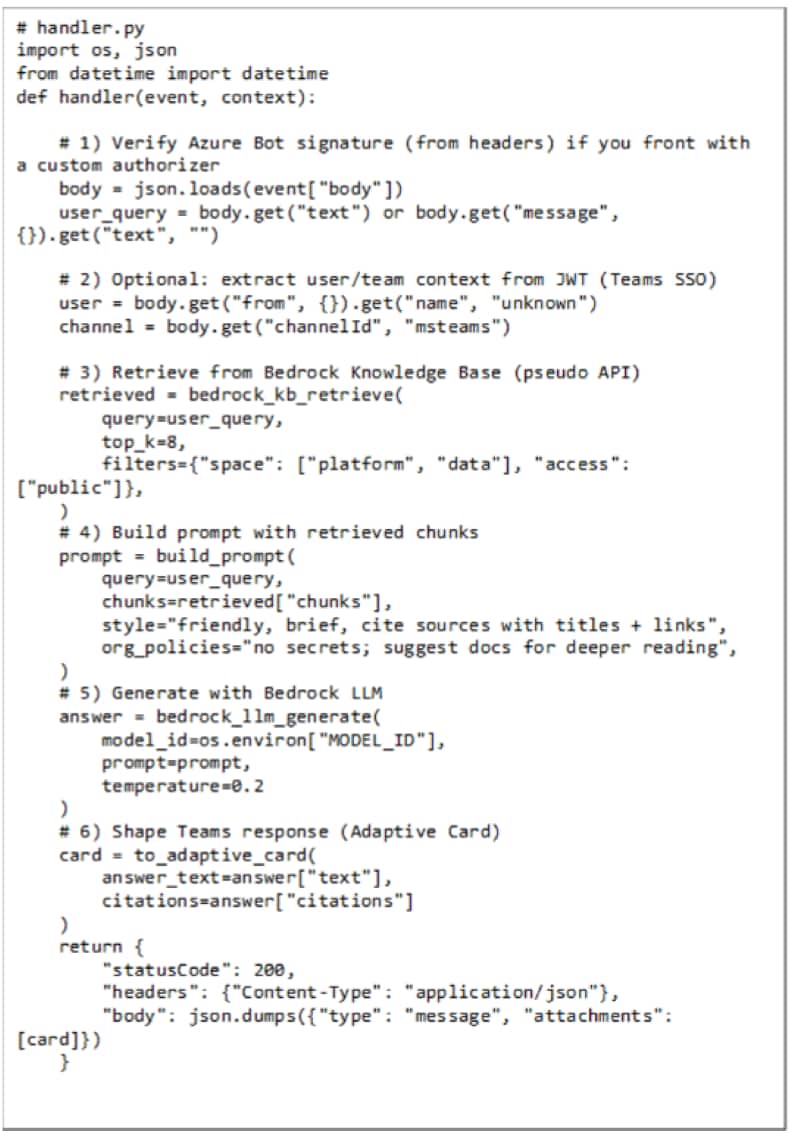
Example: Query Orchestrator AWS Lambda (Pseudo-Code)

How it works: end-to-end flow

Let’s walk through the journey, from doc update to Teams answer.

1. Keeping docs fresh

  • A scheduled AWS Lambda (via Amazon EventBridge) pulls the latest updates from Confluence, GitHub, or SharePoint.
  • It cleans the text, splits it into chunks, and stores it in S3.
  • The Amazon Bedrock Knowledge Bases ingest it automatically, updating the vector index.

So, when someone edits a Confluence page, the new version is available in Teams within minutes.

2. Asking a question in Teams

  • An engineer types: “How do I configure the new streaming consumer in staging?”
  • The Teams bot forwards this to Amazon API Gateway, which triggers an AWS Lambda function.
  • The AWS Lambda queries the Amazon Bedrock Knowledge Bases, retrieves the most relevant chunks, and asks the LLM to phrase the answer in a natural tone.
  • The bot replies in Teams: “You should set enable.auto.commit=false and use streamstg.internal:9092. Here’s the full guide from our Confluence page (last updated yesterday).”

No hunting across tools. No stale docs. Just the answer, right there in the flow of work.

Why this matters

This setup isn’t about replacing human collaboration it’s about removing the friction of knowledge sharing.

  • Faster onboarding: New engineers don’t have to ask the same questions repeatedly.
  • Consistent answers: Everyone gets the same, up to date guidance.
  • Better adoption: Docs get used because they’re embedded in daily workflows.
  • Future proofing: As your documentation grows, the automation keeps it fresh.

A peek behind the scenes

The beauty is in how simple each piece is:

  • AWS Lambda (Syncer): Keeps docs flowing from source to S3.
  • Amazon Bedrock Knowledge Bases: Learns static docs into a searchable, conversational knowledge brain.
  • Amazon API Gateway and AWS Lambda (Orchestrator): Glues Teams queries to Amazon Bedrock answers.
  • Teams Bot: The friendly face that makes it all usable.

With these building blocks, the Teams workspace becomes more than just a chat app it becomes the living knowledge hub which can really help engineers.

Beyond Q&A: Messaging use cases for technical teams

This isn’t just about asking, “Where’s that doc?”. When you connect Amazon Bedrock to Teams, it can become a real productivity enabler which can be used for different roles.

  • For architects: Instead of hunting through policy documents, architects can ask for guidance right in Teams. Think of it as a design assistant that suggests approved patterns and leading practices. Example: “What’s the recommended approach for multi account AWS setups?”
  • For developers: The bot doubles as a coding sidekick. It can pull up reference implementations, explain adoption standards, or even provide copy paste ready snippets. Example: “Show me the standard infrastructure as code module for S3 buckets with encryption enabled.”
  • For security engineers: A quick query can return compliance rules, preventative guardrails, or prebuilt IAM policies to drop straight into a project. Example: “Generate a guardrail to block unencrypted RDS instances.”

Lessons learned

A few things stood out during the build:

  • Automation is key: If humans are required to remember to update the knowledge base, it will likely fail.
  • Citations matter: Always link back to the source doc for context.
  • Tone matters: A dry copy paste isn’t helpful. Natural, human like answers build trust.

Wrapping up

Many organizations say, “documentation is important.” Few manage to keep it alive. By automating updates and delivering answers directly in Teams, we can create a knowledge base that’s not just up to date but also used very easily.

It will feel less like reading a wiki, and more like chatting with a smart teammate who often has the latest answer.

The next time someone asks, “Where’s the doc for that?”, the answer shouldn’t be “Check Confluence.” It should be, “Just ask Teams, it knows.”

Follow us